HIIT workouts are fast, tough, and effective. But to do them right, you need a timer that tells you exactly when to work and when to rest. A normal stopwatch isn’t enough, you want something built for intervals. That’s why a good HIIT timer or HIIT timer app makes training easier and more effective.
In this guide, we’ll show you the best HIIT timers and apps in 2025. We’ve tested them, compared the pros and cons, and kept only the ones worth your time and money. If you prefer using a smartwatch instead, don’t miss our guide to the Top Smartwatches for Fitness Tracking in 2025.
What is a HIIT Timer (and HIIT Timer App)?
A HIIT timer is a workout tool, either an app or a physical device that automatically alternates between work and rest intervals. Unlike a normal stopwatch, a HIIT timer (or HIIT timer app) is built for Tabata, EMOM, and circuit training, so you can stay focused on your workout.
HIIT Timer Comparison (2025)
| Name | Best For | Platforms | Price |
|---|---|---|---|
| Seconds Interval Timer | Best Overall | iOS · Apple Watch | One-time |
| Interval Timer – HIIT Timer | iPhone | iOS | Free + Pro |
| Tabata Timer: Interval Timer | Android | Android | Free + Pro |
| O’Coach | Free Option | Mobile app | Free |
| Gymboss Interval Timer | Physical Device | Hardware | One-time |
OUR TOP PICKS
BEST OVERALL
Seconds Interval Timer
Seconds Interval Timer is the most complete HIIT timer app we tested so far. It comes with ready-to-use templates, full customization for any workout, clear audio/visual alerts, and Apple Watch support. Easy enough for beginners but powerful for advanced users.
BEST FOR iPhone
Interval Timer □ HIIT Timer
Interval Timer – HIIT Timer is a simple, reliable HIIT timer app best suit for iPhone. It lets you set custom work and rest periods, name your workouts, and gives clear audio cues without stopping your music. It’s the go-to HIIT timer for iOS.
BEST FOR ANDROID
Tabata Timer: Interval Timer
Tabata Timer – Interval Timer is our top choice for HIIT timer app on Android in 2025. It has a simple interface that beginners will like, but also deep customisation options for serious workouts. You get voice cues, rest/work naming, background running, and the ability to save and share workouts.
Best Overall HIIT Timer App: Seconds Interval Timer
TODAY'S BEST DEALS
If we had to choose just one HIIT timer app in 2025, it would be Seconds Interval Timer. It strikes the right balance between being beginner-friendly and powerful enough for serious users. We’ve used it for Tabata, circuit training, and long EMOM workouts, and it never lets us down.
Also See: Best Fitness Apps for Apple Watch (2025)
Why It Stands Out
- Ready-to-go templates: No need to build from scratch. Choose HIIT, Tabata, or circuit and start training.
- Full customization: Want a warm-up, multiple work/rest cycles, or different sets combined? You can set it up exactly how you want.
- Clear cues: The app uses voice alerts, beeps, and color-coded screens to tell you what’s coming next, so you don’t need to look at your phone every few seconds.
- Background friendly: Works with your playlist or podcast running in the background.
- Apple Watch support: Control your workout right from your wrist.
- One-time purchase: Unlike many apps that push subscriptions, Seconds lets you unlock everything with a single payment.
What’s Great ✅
- Customizable workouts
- One-time payment
- Clean design
- Apple Watch support
What’s Not ❌
- Free version limited
- Setup takes longer
The bottom line
Seconds Interval Timer is so far one of the best HIIT apps we have tested in 2025. It’s simple to set up, yet has all the tools you need for most workout, from Tabata to long circuits. The alerts are clear, it works with your music, and you can use it on Apple Watch. If you want one HIIT timer app that does everything cleanly, this is the one to get.
Best HIIT Timer App for iPhone:
Interval Timer □ HIIT Timer
TODAY'S BEST DEALS
Interval Timer □ HIIT Timer is one of the most popular HIIT timers on the App Store, and for good reason. It’s simple, reliable, and has everything iPhone users need to keep workouts structured. And if you train with an Apple Watch, you can go even deeper by tracking recovery and stress using heart rate variability. Here’s our guide on How to track heart rate variability on Apple Watch.
Why It Stands Out
- Custom intervals: Set any work and rest times, great for Tabata, EMOM, or circuits.
- Workout naming: Save and label your workouts so you can reuse them next time you use it.
- Clear audio cues: Loud beeps or voice prompts guide you through without needing to check the screen.
- Music-friendly: Runs in the background so your playlist won’t gets paused.
- Workout history: It keeps a log of past workouts.
What’s Great ✅
- Quick and simple setup
- Clean, easy-to-read design
- Reliable audio and visual alerts
- Free version available
What’s Not ❌
- Premium unlock for full features
- iOS only, no Android support
The bottom line
Interval Timer □ HIIT Timer is the most capable choice for iPhone we have tested in 2025. It’s simple to use, runs smoothly in the background, and gives clear alerts. The free version works well for casual users, but upgrading gives you more flexibility. If you are on iOS, this is the HIIT timer to consider. And if you have a Apple Watch, you should definitely take a look at the Best Fitness Apps for Apple Watch in 2025.
Best HIIT Timer App for Android:
Tabata Timer: Interval Timer
TODAY'S BEST DEALS
Tabata Timer: Interval Timer is built for Android users who want a HIIT timer that’s both simple and practical. It’s very popular among those who do Tabata, EMOM, or circuit-style training, but it works for any HIIT workout. The app lets you create fully customizable intervals with warm-ups, work periods, rests, and cooldowns. It gives clear voice and sound cues, and it runs smoothly in the background. You can also save your workouts for later, which makes it easy to build a library of routines. For Android users, it’s one of the most reliable and complete HIIT timer apps available.
Also Read: Full Body HIIT Workout with Weights: Effective Fat-Burning Routine
Why It Stands Out
- Custom intervals: Set work, rest, and cool downs exactly the way you want.
- Voice and sound cues: Clear prompts, less chance to breaking focus.
- Save and reuse workouts: Store routines to repeat next time.
- Runs in background: Keep your music or podcast playing while you train.
- Big community trust: 200k+ reviews on Google Play.
What’s Great ✅
- Easy to use
- Highly customizable
- Free to download
- Very strong ratings
What’s Not ❌
- Ads in free version
- No iOS support
The bottom line
Tabata Timer: Interval Timer is the best HIIT timer app for Android in 2025. It’s flexible, simple, and have a huge community. The free version is more than enough for most people, but you can upgrade if you want an ad-free experience. If you’re on Android, this is the HIIT timer app you should start with.
Best Free HIIT Timer App: O’Coach
TODAY'S BEST DEALS
If you want a HIIT timer app that’s 100% free with no ads or paywalls, O’Coach is the best choice. It’s simple, clean, and gets the job done without distractions.
Also Read: 6 Best Free HIIT Timer Apps in 2025 (Ranked & Reviewed)
Why It Stands Out
- Fully free, no hidden costs
- Customizable HIIT timers
- Voice guidance during workouts
- Works in background with music
- Progress tracking built-in
What’s Great ✅
- No ads
- Easy to use
- Custom workouts
- Free forever
What’s Not ❌
- Limited advanced features
- No smartwatch support
The bottom line
If you want a HIIT timer app that is absolutely free, O’Coach is THE one to get. It’s perfect if you just want a simple timer that works. For beginners and casual HIIT workouts, this app covers everything you need without spending a cent. And if you want to pair it with a popular massage gun, read our post on Toloco Massage Gun: Full Guide, Features & Best Models
Best Physical HIIT Timer: Gymboss Interval Timer
TODAY'S BEST DEALS
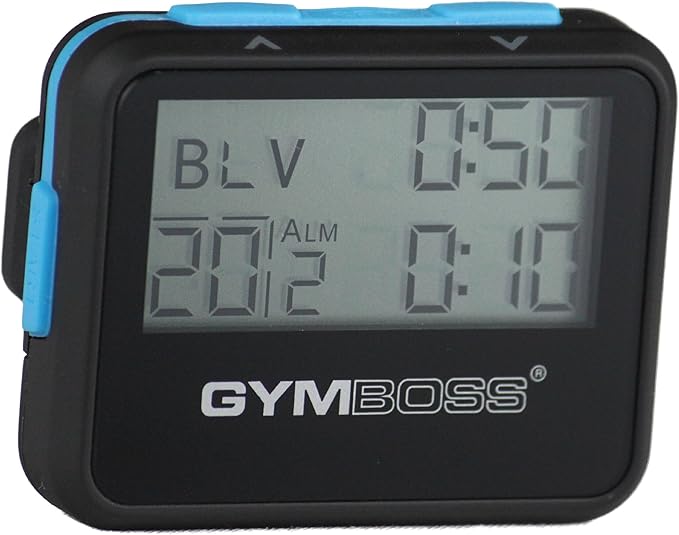
The Gymboss Interval Timer is the go-to choice if you want a simple, rugged HIIT timer that takes your phone out of the equation. It clips to your clothing, gives loud beeps or vibration alerts, and lasts months on a single battery. For people who prefer a physical HIIT timer, Gymboss is hard to beat.
Also Read: Best Pedometer Watch (2025 Guide)
Why It Stands Out
- Easy to set up intervals
- Beep or vibration alerts
- Clip-on, portable design
- Runs for months on one battery
- Sweat- and impact-resistant
REASONS TO BUY ✅
- Simple and tough
- Long battery life
- No phone needed
- Very portable
REASONS TO AVOID ❌
- Only 1–2 intervals at once
- No history or tracking
The bottom line
The Gymboss Interval Timer is the best physical HIIT timer you can buy in 2025. It’s distraction-free, durable, and perfect for anyone who doesn’t want to rely on an app during workouts. If you just want a timer that works, this is worth the consideration.
Frequently asked questions
What is a HIIT Timer App?
A HIIT timer app is a mobile app that automatically switches between work and rest intervals. It’s more convenient than a stopwatch because it provides audio or vibration alerts, custom presets, and progress tracking.
What is the difference between a HIIT timer and a regular timer app?
A HIIT timer app is built for structured workouts. Unlike a stopwatch or standard timer, it automatically switches between work and rest intervals, so you don’t have to reset it after every round.
Do HIIT timer apps work with music?
Most modern HIIT timer apps run in the background, so you can keep your playlist or podcast going. Some apps even let you assign different sounds or songs to different intervals.
What is the best HIIT Timer App for iPhone and Android?
Popular picks include Seconds, Interval Timer, and Tabata Timer. These apps let you set custom intervals, play music in the background, and save workouts for later.
What are the best HIIT timing intervals?
A common format is 20–40 seconds of work followed by 10–20 seconds of rest. Beginners often start with 30s on / 30s off, while advanced users push longer work periods with shorter rests.
How to structure a HIIT workout?
Start with a warm-up, then complete 6–10 rounds of work/rest intervals using exercises like sprints, burpees, or squats. A HIIT timer app makes this simple by guiding you through each phase automatically.
Is it better to do HIIT in the morning or evening?
Both are effective. Morning HIIT boosts energy for the day, while evening HIIT can help relieve stress. The best time is whenever you can be most consistent.